●Exception1)執行上的錯誤=>bug處理2)捕捉exception=>try{ ...}catch(異常類型 物件名) {....}3)多重捕捉=>try{...} catch(異常類型 物件名) {....} 4)exception api分類throwable=>error =>stackOverFlow(遞迴) =>.... =>exception =>RuntimeException =>(非 RuntimeException ) **說明:1. java.lang.throwable=>只做兩個動作1.中斷2.拋訊息,其他條件都由繼承的子類別來做2.error=>嚴重錯誤3.exception=>異常=>可不修改程式碼=>加說明4. RuntimeException=>JRE設定好,自動檢查(自動捕捉),可不加 try{ ...}catch() {....}也可=>unchecked,可以編譯,不用捕捉也看的到,只是使用者不知道5. 非 RuntimeException=>JRE沒有設定自動捕捉訊息=>一訂要加 try{ ...}catch() {....}=>checked=>不能編譯,要加try{}catch(){}才能編譯,即要自己做檢查機制6.建構式中如果有throws,會啟動該throw下的exception去檢查 import java.util.Scanner;
class ex1{
public static void main(String args[]){
Scanner sc=new Scanner(System.in);
int n=sc.nextInt();
for(int i=0;i<n;i++){
System.out.println("hello");
}
}
}
**說明:
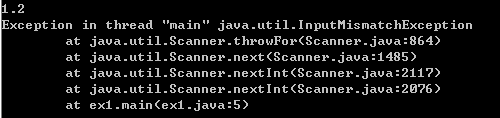
1.java.util.InputMismatchException這個exception是runtime的
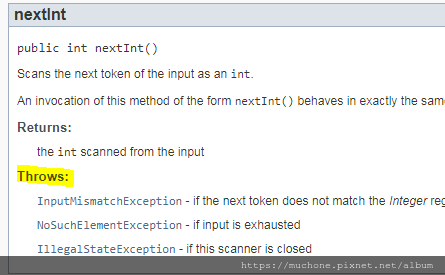
2.查的方式是去api看Scanner下的nextInt(),有一個throws,下面有exception
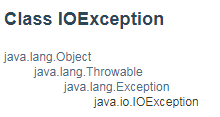
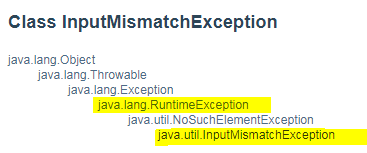
3.點任何一個exception進去看,可以看到繼承關係,這些都是屬於RuntimeException
舉例import java.util.Scanner;
class ex1{
public static void main(String args[]){
Scanner sc=new Scanner(System.in);
try{
System.out.println("請輸入陣列數量");
int m=sc.nextInt();
int[] x=new int[m];
System.out.println("請輸入索引號碼");
//new java.util.InputMismatchException()
int n=sc.nextInt();
//new java.lang.IndexOutOfBoundsException()
x[n]=100;
//new java.lang.ArithmeticException()
System.out.println(10/n);
for(int i=0;i<n;i++){
System.out.println("hello");
}
}catch(java.util.InputMismatchException e){
System.out.println("輸入整數");
}catch(java.lang.ArithmeticException e){
System.out.println("分母不可為0");
}
catch(java.lang.IndexOutOfBoundsException e){
System.out.println("索引號碼錯誤,要n-1");
}
}
}
**說明:
當出現異常的時候,其實就是在那個步驟時,new了一個exception(因為exception是class=>是物件),然後new完的建構式去做中斷和丟訊息的動作,當出現catch時,就會等待直到把exception物件丟給指定的變數這個例子的指定變數為e),收到以後就會轉換成去執行catch內的內容
5)非RuntimeException(編譯時就會提醒你)a)一定要捕捉,方式有二=>try....catch=>throws(拋出)b)一般定義在2個部分=>constructors=>methods 舉例,使用java.io.File=>class File是用來開檔案或資料夾.PNG)
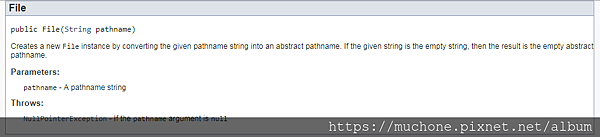 =>會先chk是否有一樣的檔名,true or false,有一樣就不動作,沒有就產生新的檔,有Exception
.PNG)
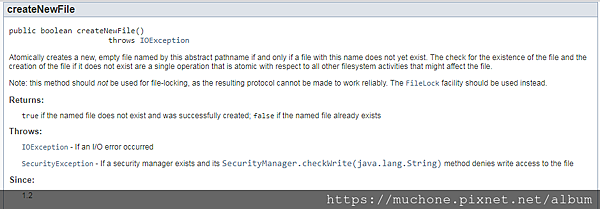 =>為非runtimeexception
import java.io.File;
class ex2{
public static void main(String args[]){
//在c下面新增一個txt檔,這裡只是先new物件,產生檔案要用method
File f=new File("c:/a.txt");
f.createNewFile();
}
}
**說明:
1.編譯時產生error,所以要改程式碼
2.錯誤訊息:需要被捕捉(try....catch...)或被拋出(throws)
3.因為有IOException,但沒有跟編譯器說要怎麼處理
作法一:try...catch自己寫說明import java.io.File;
import java.io.IOException;
class ex2{
public static void main(String args[]){
try{
File f=new File("c:/a.txt");
f.createNewFile();
}catch(IOException e){
System.out.println("無法新增");
}
}
}
**說明:
會出現無法新增,因為c:會有權限問題無法寫入,把寫入位置改為c:/java/14/a.txt即可
作法二:throws,不用寫說明mport java.io.File;
import java.io.IOException;
class ex2{
public static void main(String args[]) throws IOException{
File f=new File("c:/a.txt");
f.createNewFile();
}
}
**說明:
1.改用throws,就是在method後面加上throws 異常類別,如上,如果有多個,可用","隔開
2.用throws以後編譯可過,執行時會自動出現說明,但只有dos介面看的到,一般使用者視窗介面就看不到
3.有時用在檢查程式,判斷是否之後要寫說明
c)自訂Exception(非RuntimeException)1.使用 Exception(針對方法) (Exception要在main執行時用)=>內容 =>使用if(沒有中斷機制) =>throw new Exception();=>方法或建構式:throws Exception用if但不加exceptionclass student{
String name;
int chi;
int eng;
student(String name,int chi,int eng) {
if(chi>=0 &&chi<=100 && eng>=0 &&eng<=100){
this.name=name;
this.chi=chi;
this.eng=eng;
}
}
void show(){
System.out.println("名:"+name+
"\t國文:"+chi+
"\t英文:"+eng
);
}
}
class add{
public static void main(String args[]){
student[] s={
new student("kent",200,91),
new student("maggie",86,92),
new student("derek",85,93)
};
for(int i=0;i<s.length;i++){
s[i].show();
}
}
}
**說明:
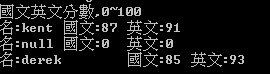
1.用if在建構式先做判斷,沒有加else,所以如果超過這個範圍就不更新資料,用初始值
2.但是當輸入的內容超過範圍,程式還是會跑完全部,而非停在出錯的 new student("kent",200,91)
3.如過用exception就會在出錯的 new student("kent",200,91)停止,不會繼續run,當後面資料和前面資料有關聯時,用exception比較適合
用exception+ifclass student{
String name;
int chi;
int eng;
student(String name,int chi,int eng) throws Exception {
if(chi>=0 &&chi<=100 && eng>=0 &&eng<=100){
this.name=name;
this.chi=chi;
this.eng=eng;
}else{
throw new Exception();
}
}
void show(){
System.out.println("名:"+name+
"\t國文:"+chi+
"\t英文:"+eng
);
}
}
**說明:
1.exception要搭配if來使用,放在else中,代表如果沒有符合條件,就把exception()這個物件丟出去給使用student建構式的人
2.但假設沒有在 student(String name,int chi,int eng)後面加上 throws Exception,就會出現如上錯誤訊息,代表需要捕捉或拋出
3.所以要在 student(String name,int chi,int eng)後面加上 throws Exception,代表從student拋出去
4.thorows Exception是在等else裡面的new Exception產生
5.如果在else{}中只寫new Exception(),前面沒有加throw,會只在else{}中產生沒有辦法丟出去,因為生命週期,所以要加上throw才能丟出去給建構式外的throws接收
** 這邊的Exception其實是用java.lang.Exception class(裡面有包含自訂exception的功能)
使用我們自己訂的Exceptionclass add{
public static void main(String args[]){
student s1=new student("kent",87,91);
}
}
**說明:
在main執行我們自己做的exception,也是要捕捉,不然會出現錯誤,因為非runtime
class add{
public static void main(String args[]){
try{
student s1=new student("kent",87,91);
}catch(Exception e){
}
}
**說明:
所以要用try...catch或throws
使用try...catch和throws兩個的差別
class student{
String name;
int chi;
int eng;
student(String name,int chi,int eng) throws Exception{
if(chi>=0 &&chi<=100 && eng>=0 &&eng<=100){
this.name=name;
this.chi=chi;
this.eng=eng;
}else{
throw new Exception();
}
}
student(int chi,int eng) {
try{
if(chi>=0 &&chi<=100 && eng>=0 &&eng<=100){
this.chi=chi;
this.eng=eng;
}else{
throw new Exception();
}
}catch(Exception e){
System.out.println("國文英文分數,0~100");
}
}
void show(){
System.out.println("名:"+name+
"\t國文:"+chi+
"\t英文:"+eng
);
}
}
(狀況一:add沒有加 throws Exception 或 try...catch)
class add{
public static void main(String args[]){
//因為main沒有加throws Exception所以compiler會出現錯誤
//student s1=new student("kent",870,91);
//出現 國文英文分數,0~100
student s2=new student(870,91);
}
}
(狀況二:add有加throws Exception 或 try...catch)
class add{
public static void main(String args[]){
try{
student[] s={
new student("kent",87,91), //see 說明4.
new student(86,92), //see 說明5.
new student("derek",85,93),
};
for(int i=0;i<s.length;i++){
s[i].show();
}
}catch(Exception e){
System.out.println("分數:0~100");
}
}
}
**說明
1.如果在寫建構式或方法時,exception是透過throws Exception來處理,則解說要在執行的時候寫在main裡=>此時如果main方法沒有寫throws Exception,編譯就會過不了
2.也可以在寫建構式或方法時, exception 不要透過throws Exception來處理,而是直接在建構式中寫好解說(try...catch寫在建構式中),可以編譯
3.通常contructor會用try...catch加在裡面,method會用throws Exception的方式
4.在狀況二中,若改為 new student("kent",-87,91),會outputs "分數:0~100"
5.但在狀況二中,若改為 new student(-86,92),則會outputs如下內容,先在輸入-86那筆資料的建構式做中斷,然後其他資料還是繼續可以跑,並且跑下面的迴圈,因為try...catch寫在建構式中,生命週期在該筆資料寫入後就結束了,不影響其他筆資料的輸入
**在建構式中的try catch是針對每一筆填入的資料中斷,其他筆資料會繼續做,但放在main中就要確定全部資料都對不然就會中斷不能再填資料,通常前者的用法會用在web讓user填寫資料,因為會同時多人一起進行,不能一個寫錯就全部中斷,只能針對每一筆資料做判斷不影響其他筆資料
例:假設此時有兩個method,但規則不同,如果同時有兩個不同method出現Exception該如何判斷catch要抓哪個?
class student2{
String name;
int chi;
int eng;
student2(String name,int chi,int eng) {
if(chi>=0 &&chi<=100 && eng>=0 &&eng<=100){
this.name=name;
this.chi=chi;
this.eng=eng;
}
}
int sum1(int chi,int eng) throws Exception{
if(chi>=0 &&chi<=100 && eng>=0 &&eng<=100){
this.chi=chi;
this.eng=eng;
return chi+eng;
}else{
throw new Exception();
}
}
int sum2(int chi,int eng) throws Exception{
if(chi>=0 &&chi<=200 && eng>=0 &&eng<=200){
this.chi=chi;
this.eng=eng;
return chi+eng;
}else{
throw new Exception();
}
}
void show(){
System.out.println("名:"+name+"\t國文:"+chi+ "\t英文:"+eng );
}
}
class add2{
public static void main(String args[]){
student2[] s={
new student2("kent",87,91),
new student2("maggie",86,92),
};
for(int i=0;i<s.length;i++){
s[i].show();
}
try{
System.out.println(s[0].sum1(60,90)+s[0].sum2(70,80)+s[1].sum1(60,90)+s[1].sum2(70,80));
}catch(Exception e){
//同時違反兩個規則時,如何判斷要show 0~100 或 0~200
System.out.println("0~200");
}
}
}
**說明:
1. 要修改分數後再加總,要兩個人都對了才能加總,
2.通常exception都會用在傳值類的method
3.用自訂Eexception
4.要把不同method的檢驗機制放進Exception中,但Exception只能中斷,不過可以提供繼承,把中斷功能繼承給子類別,見下方說明
2.繼承Exception=>自訂Exception Classclass check extends Exception{
check (String msg){
System.out.println("需介於"+msg);
}
}
class student2{
String name;
int chi;
int eng;
student2(String name,int chi,int eng) {
if(chi>=0 &&chi<=100 && eng>=0 &&eng<=100){
this.name=name;
this.chi=chi;
this.eng=eng;
}
}
int sum1(int chi,int eng) throws check{
if(chi>=0 &&chi<=100 && eng>=0 &&eng<=100){
this.chi=chi;
this.eng=eng;
return chi+eng;
}else{
throw new check("0~100");
}
}
int sum2(int chi,int eng) throws check{
if(chi>=0 &&chi<=200 && eng>=0 &&eng<=200){
this.chi=chi;
this.eng=eng;
return chi+eng;
}else{
throw new check("0~200");
}
}
void show(){
System.out.println("名:"+name+
"\t國文:"+chi+
"\t英文:"+eng
);
}
}
class add2{
public static void main(String args[]){
student2[] s={
new student2("kent",87,91),
new student2("maggie",86,92),
};
for(int i=0;i<s.length;i++){
s[i].show();
}
try{
System.out.println(s[0].sum1(60,80)+s[0].sum2(70,280)+s[1].sum1(60,90)+s[1].sum2(70,80));
}catch(check e){
}
}
}
**說明:
1. check已經自動繼承Exception的中斷功能
2.要記得把class Exception都改成class check,因為已經繼承了改使用class check
3.catch(check e),這邊如果改成Exception e也可以,而因為多型的概念(Exception 是所有自訂Exception class的共同父類別)=>多型的宣告方式;Exception e=new check(),這邊又是e=new check(),所以換成Exception e也會正確執行
**實例.PNG)
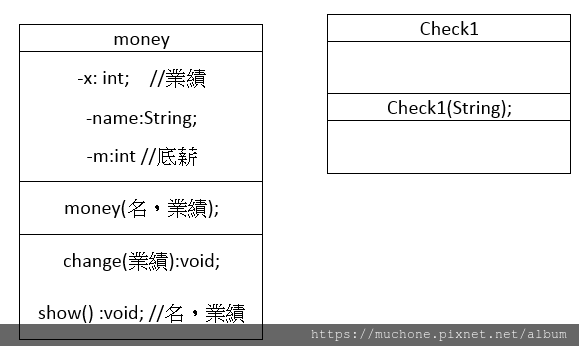 =>業績<500000時,獎金比=0=>業績>=500000時,獎金比=0.03
class check1 extends Exception{
check1(String msg){
System.out.println(msg);
}
}
class money {
private String name;
private int x;
private int m;
money(String name,int x) throws check1{
if(x>=0){
this.name=name;
this.x=x;
if(x>=500000){
m=(int)(18000+x*0.03);
}else{
m=18000;
}
}else{
throw new check1("業績需大於0");
}
}
void show(){
S ystem.out.println("名:"+name+"\t業績:"+x+"\t實領薪資:"+m);
}
}
class add3{
public static void main(String args[]) throws check1{
money m1=new money("kelly",560000);
m1.show();
}
}
**說明:
因為在check1中已經有寫說明了,所以在main程式中不需要再用try...catch來寫說明
同上例,如果事後想要修改業績,因為x為private,所以要寫method來改void change(int x) throws check1{
if(x>=0){
this.name=name;
this.x=x;
if(x>=500000){
m=(int)(18000+x*0.03);
}else{
m=18000;
}
}else{
throw new check1("業績修改需大於0");
}
}
class add3{
public static void main(String args[]) throws check1{
money m1=new money("kelly",560000);
m1.show();
m1.change(-6000);
m1.show();
}
}
**說明
1.加一個change() method,一樣要做判斷,調整一下判斷顯示的訊息
2如果用錯誤的業績數字輸入修改,此時會自動抓取change()中的判斷
3.outputs為 業績修改需大於0
.PNG)
.PNG)
.PNG)
.PNG)
.PNG)
.PNG)
.PNG)



.PNG)

.PNG)

.PNG)


.PNG)
.PNG)

.PNG)

.PNG)

.PNG)

.PNG)
.PNG)
.PNG)

 繪圖軟體練習 (2)